Learn the most popular programming language of the most popular Operating System: Windows

Ad

Showing posts with label Computer Fundamentals. Show all posts

Data Processing Concepts

Computer processing involves manipulating the symbols that represent things.  It is the fastest and most accurate way of performing human tasks.  The word ‘data’ is the plural of ‘datum’ means fact.  It has three basic activities:

a)  Capture Input data through input devices.

b)  Manipulate by:

  1. organizing similar items into groups of alphabetic or alphanumeric codes
  2. Calculating
  3. Storing in logical order
  4. Summarizing in concise and usable form.

c)  Managing output results by storing, retrieving, communicating and reproducing.

Need for Validation of Data:  In addition to checking the correctness, data needs to be validated.  This is performed during data preparation by visual review, logic validation tests etc. before it enters the processing run.  It requires the logical capabilities of a computer program.  Depending on how the application is designed, validation is performed during recording or conversion activities for early detection of errors.

Types of Validation Check = Check Digit:  A check digit is determined by performing some arithmetic operations in such a way that typical errors are detected.  Some methods are duplicating, echo check, validity check etc.

Input Validation:  Before data is used, it is usually tested for errors.  A separate input validation run or edit run may be used.  It is performed on an input terminal.  If errors are detected, it is shunted aside and written on an error file.  Error logs are made to prevent duplicate corrections.  Some validation checks are valid code, valid characters, valid field size etc.

Control and Security:  The control over the quality of data processing should be established not just with a correct program but by a series of controls.  Error detection and control procedures can be applied in data recording transmission, preparation, input, files and programs, output, distribution of output etc.

Need for Control of Access to Data Files, Procedures & Equipment:  A data processing installation should establish and follow procedures to safeguard hardware, programs and data files from loss or destruction and in such an eventuality for reconstruction and recovery.

Access to the computer centre should be restricted to those having a need to be there.  There must be special safeguards against access to computing resources and files.  Some safeguards are use of ‘Lock Word’ or ‘Pass Word’,  users catalog, scrambled data fields for confidential data etc.

Procedure Controls:  In order to avoid or minimize destruction of data or programs, procedural controls can be used in Management.  Some of these are external labels, magnetic tape file protection rings, Library procedures etc.  Programs and files must be protected by copying and storing away from the premises.  Any changes to program must be approved  by program Manager or Processing Manager and a record kept.  Program library management softwares are helpful.

Next: Introduction to Visual Basic

Share:

Concept of File

The data needed to develop a file are gathered from different sources.  These facts are then logically organized and stored in storage media to create a file records.  The objectives of file organization are: (1) To provide a means for locating, processing, select or extracting and (2) Create and maintain it.  Some consideration for file design are file size, Item Design, Cost of file media, ease for file maintenance, file privacy etc.

The data processing organization are sequential, random, indexed random and indexed sequential.

Sequential File Organization:  In this, records are stored in serial order by record key and uses batch transaction.  Thus processing is easy.  It is termed as Sequential Access Method (SAM). The File design is simple.  Low cost due to magnetic tape being used.  However, the entire file must be processed and transaction must be sorted in the same order as the file.

Magnetic Tape - Image Source: www.wikipedia.org

Random File Organization:  In random, any location can be read without reference to its previous items.  The record key will then be transformed into a storage address.  This method is called ‘Randomizing’.  In randomizing, two or more record keys may produce identical disk address.  This is called a ‘Collision’.  In this event one of the records is stored in an over-flow location.  In situation when records are to be located, it will be done quickly and randomly.  it is termed as Direct Access Method (DAM) or Basic Direct Access Method (BDAM).

Indexed Random File Organization:  Separate indexes are maintained in which the records are found.  The index will be in order by record key, for searching sequentially or in binary form.

Indexed Sequential Access Method (ISAM): In this the records are stored sequentially by record key but indexes are also maintained to allow direct retrieval based on key value.

Next: Data Processing Concepts.

Share:

Softwares

Softwares are Programs.  A program is a set of instruction to the computer to make it do things.  Computers are just an inert mass of electronic gadgetry.  It comes to life only when a program is fed into it.  these programs can be bought or tailor made.  There are three types of softwares - System, Utility and Application softwares.

System Softwares  These are instructions to the computer to do things. It control different parts of the computer, languages etc. and has three parts: Operating System, Utility, Languages & Compiler.

Operating System  An O.S. is regarded as a set of programs which permit continuous operation of a computer with minimum intervention of the operator. Written by manufacturers, these govern the processors, memory and I/O devices. These interface user's programs and computer components. Some OS. are PC DOS, CPM, OASIS, UNIX, XENIX etc.

Utility:  Softwares that enable common tasks to be done on the computer are known as Utility Softwares. Users have no control over it. Debugging, backup, sorting, merging, recovering erased files, protecting from unauthorised users, loading programs to memory, duplicating etc. forms part of Utility softwares.

Application Softwares:  Programs that are tailor made ie. accounting, inventory etc. are application softwares.

Compilers:  These translate high level languages like Visual Basic into machine language. With compiling run it solves problems through procedures. A compiler program substitutes an assembly program.

Interpreters:  In PCs an alternative to using compilers is often employed for high level languages. With this the source program is converted into machine language as needed for processing data. It eliminates the need for separate compiling run.

Object Program:  When Assembly language is converted into machine language it is called Object Program. The Source Program is read and translated into machine language by an Assembler.

Technorati Tags:

Next: Concept of Files

Share:

Output devices

Instruments for interpretation and communication between human and computers are output devices. These devices take machine coded output results from the processor and convert them for human reading. Display screens and printers are output devices.

Visual Display Units (VDU):  It is an output media. These are called Cathode Ray Tubes (CRTs) (an electronic tube with screen for display), Video Display Terminal (VDTs) etc. A characteristic feature of CRT is the cursor (blinking light) which indicates the position of the character on the screen. The display that appear on the screen is know as Display Memory. CRTs display 24 lines and upto 132 characters. Scrolling may be done to see more lines.

Visual Display Unit - Image Source: www.wikipedia.org

Printers:  Printers fall into three basic categories. They are Page Printers, Line Printers and Character Printers. Page Printers provide a complete page image in a single operation by laser or electro-static methods. Line Printers produce a line of characters all at once. Most line printers produce 120-144 characters per line. Most common is 132 characters. Character Printers form one letter at a time. There are two ways to do this. Letter Quality create fully formed letters like a typewriter. Dot Matrix create characters as a series of rectangular do matrix. It is faster than letter quality, but print quality is not so good.

Line Printer - Image Source: www.wikipedia.org

Other Printers are Impact Printers where the print head strike the paper. Non-Impact Printers which minimize the amount of physical movements. Thermal Printers form characters by burning them on specially treated paper.

Electro Static Printers:  Operate similar to thermal printers using toner etc.

Ink Jet Printers:  Squirt stream of ink to the surface of the paper which dries instantly.

Peripherals:  The input/output and secondary storage units are sometimes called peripherals because they are located usually near the processor.

Next: Softwares

Share:

Input Devices

Devices used for data entry purposes are called Input Devices. Key Board, Mouse, Input Pen, Track Ball, Joystick, Microphones, Touch screen, Input Tablet are all Input Devices, but Key board remains most common. It is very similar to a typewriter key board. However, it has additional numeric key pads, functions keys etc.

Magnetic Ink Character Recognition (MICR):  The encoding of documents with magnetic ink characters is limited to banking business. It consist of numbers plus some special characters that are pre-coded but could be read by banking personnel. The technology allows computers to read information (such as account numbers) off of printed documents. MICR characters are printed in special typefaces with a magnetic ink or toner, usually containing iron oxide.

Terminals:  Data may be entered into computer through terminals. These are connected to the computer either by cables or by data communications or accumulate data for subsequent input.

Intelligent or Programmable or Logic Terminals:  It essentially contains a small processor and a fairly small memory. Thus program can be stored, validate input, direct communications with a larger computer etc.

Non-Intelligent or Non-Programmable Terminals:  It must be connected to a computer to accept data. Such inputs are processed immediately or subsequently. Type writers used in Timesharing Terminals are this type.

Remote Batch Terminals:  It groups data into blocks and transmit to a computer. It consists of a remote console, input device, output device and used as a stand alone computer or job entry terminal.

Next: Output Devices.

Share:

Secondary Storage Devices

Secondary or Auxiliary storage are used to supplement the limited storage capacity of the primary storage section. these devices are On-line to the Processor. They accept data and programs from the processor, retain them and write them back as required. Both floppy disks and rigid disks are secondary storage for PCs. The rigid disks are generally sealed in their storage devices unlike floppies, which are removable. Floppies are Off-line. Once it is removed the data or instructions are inaccessible.

Some of the secondary storage devices are:

  1. Magnetic Disks:  A disk drive can be used as an input/output media. It is a flat circular plate in aluminium, coated with ferric or chromium oxide. Known as Direct Access Storage Device (DASD), it need not be processed sequentially. So it is flexible and faster. Characters are recorded by magnetizing microscopic areas on the disks surface. It is mounted on a spindle that causes it to rotate. A Read/Write head that is positioned by the disk drive moves back and forth across the disks' radius retrieving or storing data. Data may be recorded on both sides of a disk.
  2. Disk Packs:  Many hard disks attach several disks to one spindle and the disks rotate together. It floats on an arm without touching the surface. This is known as Disk Pack. The R/W head is mounted on access arms allowing it to move from one track to another. the total collection of tracks available on one movement is known as Cylinder. The speed is instant, storage capacity is enormous. The disk diameter is 14".
  3. Hard Disks or Fixed Disks:  HDs may be fixed on their drives or may be removable. They are usually about 14" diameter. Smaller ones are used in micro-computers. One such system is known as winchester or mini-winchester uses 8" or 6 1/4" platters. These are sealed in their drives.
  4. Flexible Disks, Diskettes:  These are called floppy disks or floppies. It is a thin plastic sheet base and are used in micro and mini-computers. It sizes are 3 1/2", 5 1/4" and 8".
  5. Magnetic Tape:  It consists of a long strip of plastic similar to video/audio tapes, coated with an iron oxide compound that is magnetized. it is wound on a 10 1/2" reel for use in Main Frame and Mini Computers. Data are recorded and read using a tape drive. they are organized into records called Blocking Factor. A group of such records is called Block. It is a sequential media and is slower than floppy or hard disks.
  6. Mass Storage Systems:  Industry's need for machine-readable storage is increasing. Thus Data Catridge system was developed. It can store data in a series of 50MB catridges. A catridge is loaded into the R/W head and after processing it is stored away. This system is however slow.

Next: Input Devices

Share:

Primary Storage

A computer's memory stores data and program that controls the processing. They are stored in cells at one byte per cell. This storage is called memory, main memory, primary memory, main storage, primary storage, random access memory etc. The processor has access to each cell, but it cannot think. The primary memory is used for four purposes:

  1. To hold data into input storage area until ready for processing;
  2. To hold intermediate results into a working storage space.
  3. To hold finished results in output storage area until released.
  4. To hold processing instructions in program storage area.

The above areas are not fixed by built-in boundaries. It varies from application to application.

Random Access Memory:  The primary storage is referred to as RAM Chips. Random because the locations on a chip can be selected randomly to store/retrieve. These chips are classified as dynamic or static.

Dynamic chips contain (a) a transistor much the same way as a mechanical on/off switch (b) A capacitor capable of storing an electric charge. A no charge=0 bit of hold charge=1 bit. It is Volatile. To locate a particular cell, rows and column addresses are required.

Static RAM chips are also volatile. It takes more transistors, more space and more complicated than Dynamic RAM chips.

Image Source: www.wikipedia.org

Due to more storage at lower-cost compactness and faster performance, semi-conductor chips are used in modern computers. Within limits, memory can be added by adding chips.

Note:  In February 1991, the IBM (Dr. Rajiv Joshi), developed a chip named "Lightening" that can send or receive 8 billion bits (the fastest "data rate") of information per second. It has a Static Random Access Memory (SRAM) that holds 524,288 bits and reads information in 4/Billionth of a second.

Magnetic Drums  Prior to RAM, magnetic drums were used. It revolved under a set of Read/Write head to store or retrieve data. This was relatively slow. In the 50's a memory that recorded bits magnetically on small iron pieces called Cores was deviced. Known as Core Memory, it stored and retrieved data electronically and randomly.

Read Only Memory (ROM)  With special programs higher level operations are performed. These are called micro-programs. They deal with low level machine functions. The micro-programs are held in special control storage elements in the processor and are called Read Only Memory chips (ROM). It stores programs and data that are essential for proper operations of the system. These form integral part of the computer. It is non-volatile and supplied by the vendor. The users have no control over it.

Programmable Read Only Memory (PROM)  Lengthy operations that are executed slowly by a software, can be converted into micro-programs and fused into ROM chips called PROM. In hardware form, execution becomes faster. Once written into PROM, they cannot be altered. These are also supplied by vendors.

Erasable & Programmable Read Only Memory (EPROM)  These are ROM chips that can be erased and reprogrammed. These are to be removed from the processor and exposed to ultraviolet light for accepting new contents. This is not useful for application programs.

The USB Flash Drives are now built on this technology.

Electrically Erasable & Programmable Read Only Memory (EEPROM)  Chips that are programmed with special electric pulses are called EEPROM.

Next: Secondary Storage Devices

Share:

Computer Hardware

Functional Diagram of Computer:

Source: www.wikipedia.org

Buses:  Circuits that are provided between two or more devices like CPU (Central Processing Unit) and Peripherals for communication are called Buses. these are parallel electrical lines. All 8 bit PCs have built-in eight line data buses.

Registers:  It is a device capable of storing a specific amount of data. In microprocessor chips there are circuits and special storage locations, to perform arithmetic and control functions called Registers.

Hardware:  The functional units of a computer system and programs assembled to accomplish specific tasks is called hardware devices. The System Unit containing various electronic circuit boards make the whole computer function effectively irrespective of its size.

Central Processing Unit(CPU):  The main component of a computer hardware system is the Processing Unit. It is called a processor in large or microprocessor in small computers. It is called CPU when more than one unit is added on a centrally placed processing unit to store and process data. It has three parts. The heart of the system is the Primary Memory or Storage. In this both data and programs are stored.

An Arithematic Logic Unit (ALU) performs the calculations and makes comparisons between units of data.

A Control Unit controls the operations of all the hardware as the program dictates CPU establishes the power of a hardware which is described in terms of the size of the memory. While the memory is measured by the number of characters of data it can store, the speed of the Control and ALU is measured in Million Instructions per Second (MIPS) or Megahertz.

Speed:  The speed of the processor is governed by two thing, which are the number of operating cycles and the amount of data it can process in one cycle. In an operating cycle an amount of data from memory to ALU is transferred by the processor, calculates it and transfers the results back to the memory and then to the output device.

Next: Primary Storage

Share:

Character Coding

Most computers use a coded version of true binary to represent characters. Many coding schemes have been developed over the years. The most popular is Binary Coded Decimal (BCD). In this a set of 4 to 6 bits is encoded. The most common method is to encode a pack of 2 numeric digits in an 8 bit byte called Packed Decimal. In another form straight binary string of a fixed set of bits; say 32, 36 or more are used.

The 4 bit positions of BCD are interpreted as a Straight Binary. It is known as Natural Binary Coded Decimal (NBCD). This is the most common code. The binary string encodes a quantity in the binary number system.

Extended Binary Coded Decimal Interchange Code (EBCDIC): There are also two popular 8 bit codes. This is used in IBM Mainframe models and in similar machines of other manufactures. It is called EBCDIC.

ASCII-8: In larger machines ASCII-8 an 8 bit version is used in data communication. This is used to represent data internally in PCs.

>Next: Computer Hardware.

Share:

How Computers Remember

Every piece of information that is entered into a computer's memory is encoded as some unique combination of the digits 0 and 1. These 0 and 1s are called Bits. A bit is an electronic device that is either On or Off, representing the 0 or 1.

Byte: A byte is the amount of computer memory that can store one character of data. A character is an alphabet, a digit or a symbol. It is made of 8 bits and as such a particular combination of ON or OFF determines the character held in that byte.

Kilo Byte: Even the smallest of computers has a memory of thousands of bytes. So there is a larger unit of memory called Kilo Byte (KB or K) 1K = 1000 bytes approximately (actually 210 = 1024 bytes).

Megabyte: This is 1024 x 1024 = 1048576 or say 1 million bytes.

Data Item, Group Item: Computers operate on data to communicate results. Data must be arranged in pre-determined ways to satisfy the numeric, alphabetic or alphanumeric forms demanded by a programe. they are organized into characters, field, record and file.

Characters: It is the building brick of information. It is a letter, a digit or symbol. All information is made up of characters.

Field: Each piece of information formed with the use of characters is called a field of information.

Record: A collection of related characters grouped into Fields becomes a record. the computer compares and performs the tasks in a predetermined order. Steps are then taken on the basis of the result.

File: A collection of records make a File.

Next: Character Coding

Share:

Classification of Computers

Computers are classified into 3 categories; Digital, Analog and Hybrid.

Digital: It is a counting device. The data are coded into Binary digits i.e. 0s and 1s. It manipulates the data that are given to it. These are further classified on the basis of use and size.

Analog: It works by measuring voltage by the supply of continuous electrical signals. Its output results continuously. eg.: Speedometer of a car, petrol pump meter etc. These have parallel functions as such it is very fast but the accuracy is only 99%.

Hybrid: It is a combination of digital and Analog Computers. Some calculations are done in Analog and the data then converts the signals into digital or vice versa. It uses a modem (Modulator Demodulator).

The types of computers that are based on size generally are Super Computers, Mainframes, Super Mini, Mini and Micro Computers. All these does one and the same thing ie. computation but the industry has given these names for identification purposes only.

Next: How Computers Remember?

Share:

Computer Generations

Computer Generation: The ENIAC (Electronic Numeric Integrater and Calculater), EDSAC (Electronic Delay Storage Automatic Calculator), UNIVAC-I (Universal Automatic Computer) were known as First Generation computers. They were slow, used Vacuum Tubes and high power, large space to house and had limited programming capability.

The second generation started arriving in 1959. It used solid state components like Transisters developed by Bell Laboratories in 1947, was smaller in size faster and had greater computing capabilities and used high-level programming languages. It transacted either scientific/non-scientific applications, not both.

IBM's System/360 family of Mainframe Computers in 1964 could do both scientific and non-scientific applications. These were Third Generation Computers. In this the processing were provided at a central place.

The development of Mini-computers by Digital Equipment Corporation (DEC) in 1965 filled the gap left by bigger, faster centralized approach of Mainframe Computers Timesharing, a term used to describe an independent processing system, was slow, but could be used from different stations. The user has direct access to a central processor giving him a feeling that the computer is exclusive for him. This was developed by John Kemeny and Thomas Kurtz. Later a microprocessor with circuits need to perform arithemetic-logic and control functions was developed for use in PCs. The circuit in this processor is built on a single silicon chip.

The Japanese call their fifth generation computers that are being produced as Knowledge Information Processing System (KIPS).

Next: Classification of Computers.

Share:

History of Computers

Development of Computers: From Abacuss used in BC 3000 for counting to micro-computers of today, have undergone tremendous changes. Logarithm for mathematical calculations was invented in 1614 by John Napier followed by William Oughtred's Slide Rule, a calculating device in 1610.
Abacus - (Source: www.wikipedia.org)

Mechanical calculators for Addition and Subtraction was first developed with the help of gears, wheels and dials in 1642 by Basic Pascal. Gottfried Von Leibaiz improved Pascal's to Add, Subtract, Multiply, Divide and extract Roots though nobody could make a machine for it.

Source: wikipedia.org

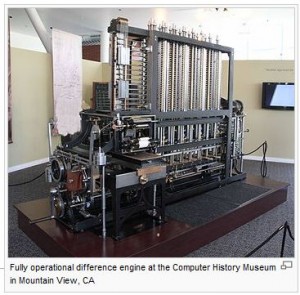
Charls Babbage (1792-1871) made the Difference Engine for Algebric Expressions and Math Tables corrected upto 20 decimal places. He later developed the Analytical Machine to do additions with memory. Lady Agusta ADA Lovelace - a Mathamatician corrected Babbage's work. She is often referred to as the First Computer Programmer. The ADA Programming Language is named after her.

Source: wikipedia.org

In 1801 Punched Cards were invented by Joseph Marie Jacquard and used in Looms for weaving designs on cloth but only in 1887 it was used as a medium for data processing.

Source: wikipedia.org

Herman Hollerith developed machine readable card by a census machine for tabulation. Hollerith in 1896 founded a tabulating machine company and later merged it with others to form IBM.

Source: wikipedia.org

Mark-I digital computer was developed by Aiken, with automatic calculating machine using electrical and mechanical technology.

Source: wikipedia.org

Using Vacuum Tubes for storage and arithemetic and logic functions, (Alanasoff-Berry Computers) made electric computers (Special Purpose).E.N.I.A.C. (Electronic Numeric Integrater And Calculator) of early 40s was the 1st electronic general purpose computer, used 18000 vaccum tubes weighing 30 tons. It could do 300 multiplications per second. In mid 40s John Von Neuman suggested using Binary Number System for building computers and store data with instructions internally. Modern computers can be called Neuman machines because of these concepts.

The E.D.S.A.C. (Electronic Delay Storage Automatic Calculator) the first stored program Electronic Computer was finished in 1949.

In early 1951, Univac-1 (Universal Automatic Computer) become operational. In 1954 the first computer for data processing and record keeping for business called UNIVAC-I was made. The IBM started producing Computers in 1955 and took the leadership in the computer field.

Next: Computer Generations

Share:

Computer Fundamentals

Definition to a Computer: Computer is a electric machine. It can store, retrieve, manipulate and transmit data (information). It carries out instructions to solve problems quickly and accurately. The name "Computer" means to reckon or "to compute" has derived from the Latin word "Computare". It can be compared to an abacuss or an adding machine.

Source: www.wikipedia.org

Characteristics: The characteristics that are found in digital computers are speed and memory. The stored program directs the performance with least intervention of the programmer (fairly automatic).

Capabilities: The basic functions of computers are (a) Arithematic Calculations ie. add, subtract, multiply, divide etc. (b) Compare (c) Store, search, retrieve and manipulate. The time required for execution of these basic operations vary from a micro second in small to a nano second (1/billionth) or less for large computers.

It works one step at a time. It is versatile, diligent and very accurate. The computer users term the errors as GIGO means Garbage In Garbage Out.

Units of Measure for Computer Speed
Unit of time Mesure
Milli-Second 1/Thousandth (1/1000)
Micro-Second 1/Millionth (1/1,000,000)
Nano-Second 1/Billionth (1/1,000,000,000)
Pico-Second 1/Trillionth (1/1,000,000,000,000)

What the Computers can do? The computers can provide the right information at the right time to the right person to enable him to take the right decisions to plan and implement it.

Next: History of Computers

Share:

Popular Posts

Search This Blog

Powered by Blogger.

Featured Post

Coded Statements and Methods

In the preceding procedure , you wrote several coded instructions, which introduced two different programming statements and a method: the D...

Labels

Recent Posts